
What is api?
API is defined as a set of features and rules that exists inside a software program(application).
In Web development, an API is generally a set of code features (e.g. methods, properties, events, and URLs) that a developer can use in their apps for interacting with components of a user’s web browser, or other software/hardware on the user’s computer, or third party websites and services.
Below given are some Examples of API
1. The getUserMedia API can be used to grab audio and video from a user’s webcam, which can then be used in any way the developer likes, for example, recording video and audio, broadcasting it to another user in a conference call, or capturing image stills from the video.
2. The Geolocation API can be used to retrieve location information from whatever service the user has available on their device (e.g. GPS), which can then be used in conjunction with the Google Maps APIs to for example plot the user’s location on a custom map and show them what tourist attractions are in their area
3.The Twitter APIs can be used to retrieve data from a user’s twitter accounts, for example, to display their latest tweets on a web page
4.The Web Animations API can be used to animate parts of a web page — for example, to make images move around or rotate.
Before starting the API Coding , the developers should have a clear idea on the following points:
- End Points
- Paths
- Parameters
- Authentication & Authorization
We can explain this terms with the help of some free API’s
Consider the free API https://kanye.rest/ which creates random kanye west quotes .
Here we can access the data by using the api https://api.kanye.rest/.So here the end point is https://api.kanye.rest/ . This can be used to display random quotes every day on your websiteAnother example is Joke API. Joke API is a little bit complex than kanye rest.Another example is Joke API. Joke API is a little bit complex than kanye rest.
Another example is Joke API. Joke API is a little bit complex than kanye rest. See the url https://v2.jokeapi.dev/joke/Programming?blacklistFlags=religious&contains=development
Here https://v2.jokeapi.dev/joke is the end point
In the URL the “programming” is the path or category . After that, we will use the question mark before starting parameters (eg: backlist Flags, contains, etc). The parameters are separated by the symbol “&”.This format is very important for all API’s. You will get all details about this API from the joke API documentation(https://sv443.net/jokeapi/v2/) .
The next is authentication, for that let me explain more complex API from openweather.org .The API will return the current weather status.Let us learn how this will be possible
The fourth point is authentication and authorisation .Let me explain this with a little bit complex API openweathermap.org . The API will return the current weather status.
Go to the Website
Сurrent weather and forecast – OpenWeatherMap
Step 1: Create an Account
Step 2: Goto Dashboard
Step 3: Find out the menu “dashboard => try the dashboard=>weather dashboard=>about=>api keys”
Step 4:Generate a new API Key
Then to refer the documentation :
Go To the Menu -> “Documentation=>Home=>API”
Find out the heading “Current & Forecast weather data collection”
Find out the link “API Doc” under the heading “Current weather Data”
An API call can generate from this documentation. The api call is like below
https://api.openweathermap.org/data/2.5/weather?q={city name}&appid={API key}
Here API key is used for authentication
Here we are passing city name and API key.You will get different method for creating api call the documentation.
So What is Authentication and authorization
- Authentication
- Authentication is stating that you are who are you are
- Authorization
Authorization is asking if you have access to a certain resource
We should have to use a well defined format for data which makes information the easiest to understand the audience.
The same principle applies when sharing data between computers. Generally we are using text format.
The most common formats found in modern APIs are JSON (JavaScript Object Notation) and XML (Extensible Markup Language).
JSON is designed for data and data only.
Being a markup language, XML is used to displaying and styling data.
JSON doesn’t do too well when it comes to mixed content, and adding meta-data to JSON is impossible without creating additional key-pair value to hold it.
JSON – Javascript Object Notation
Is a standard text-based format for representing structured data based on JavaScript object syntax.
Json is the one of the mostly used method to get data from API response,because of its light weight structure and easy to manage for developers
For getting the json string in more formatted way on the browser, we can use an extension in the chrome , JSON Viewer Pro . Using this Extension you will get the path of each item in a json structure easily. See the screenshot here
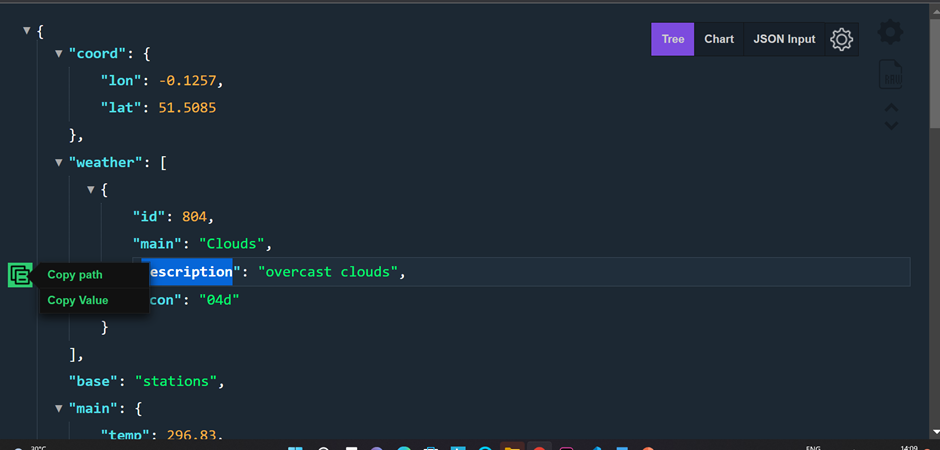
Here you can filter the different structure like tree,chart and json input from menu on the right corner of the page.
An example code(nodeJS) for managing response from an API
https.get(url,function(response){
 response.on("data",function(data){

            const weatherData = JSON.parse(data); //convert to javascript object

            const description = weatherData.weather[0].description;

         const icon = weatherData.weather[0].icon;

            const imageUrl = "http://openweathermap.org/img/wn/"+icon + ".png";
         res.write("<p>The temperature in London is" + weatherData.main.temp + "</p>");
         res.write("<h1>The description" + description+ "</h1>");
         res.write("<img src= "+ imageUrl+">");
        res.send();
    });
});
Free Api Kanye West – https://kanye.rest/
Joke API Url – https://sv443.net/jokeapi/v2/
Openweather.org – https://openweathermap.org/
Blog – https://youtu.be/np4JqLjqHDI